Ensure you have downloaded the latest version of
Métro  and
please read the "ReadMe" file in the zip file. and
please read the "ReadMe" file in the zip file. |
| |
| Start Screen |
| |
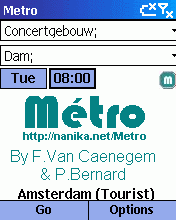
At the bottom you can see the full name of the database.
Available options are:
| Menu / Metro / Subscribe to Metro's
Mailing List |
Send the subscription mail to be informed of releases |
| Menu / Metro / Network |
To open or manage your city databases |
| Menu / Metro / [city name] |
Information about the city |
| Menu / Metro / About Metro |
Information about Metro, the authors and the translators |
| Menu / Metro / Send us some comments |
If you want to send some comments about a network,
or if you want to thanks us!!! |
| Menu / Metro / Preferences |
To change the behavior, fonts, language of Metro |
| Menu / Quit |
Exit the application |
| Menu / Raz |
To clear the departure & arrival fields |
| Menu / Back |
Compute the back route |
| Menu / Lines |
To manage the transportation lines in the city |
| Menu / Contacts |
To manage your contacts in the city |
| Menu / Sites |
To manage the sites (POIs) in the city |
| Go |
Compute the route |
| Tue |
Day of trip, tap to change |
| 08:00 |
Time of trip, tap to change |
|
 |
| Top |
| |
| Select a city |
| |
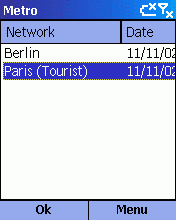
You can see the names of the databases,
the last update dates and the full pathnames.
| OK or Action or Menu / Select |
Validate and load the selected city |
| Menu / Cancel |
Cancel |
| Menu / Receive |
Receive IR database |
| Menu / Beam |
Send IR database |
| Menu / Refresh |
Update the selected database over the internet |
| Menu / Refresh All |
Update all databases over the internet |
| Menu / Delete |
Delete the selected database |
If you see "TOO OLD" in the database line, you cannot load this database,
and you will have to delete it.
|
 |
| Top |
| |
| Preferences |
| |
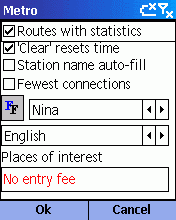
| Routes with statistics |
Include the total number of stations and connections
in the calculation results |
| 'Clear' resets time |
If you want the "Clear" button to automatically reset
the trip time to the current day and hour |
| Station name auto-fill |
The program will fill the "from" or "to" field with
the first match after you have entered 3 letters, otherwise the
program will filter the list |
| Fewest connections |
If you prefer to see the route with fewest connections
first in the results (instead of the shortest one) |
 |
Choose your font.
Copy your windows fonts to the windows/fonts folder on your PocketPC |
| Language |
Select your language |
| Places of interest |
If your text is found in the description of a place
of interest, it will be displayed in red |
| OK or Action |
Apply the changes |
| Cancel |
Cancel the changes |
|
 |
| Top |
| |
| Route search |
| |
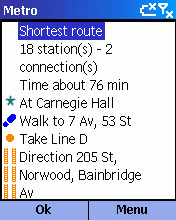
Depending on your preferences, you will see first the fewest
connections or the shortest route.
 |
Place of interest
Select "Menu/Details" to display details on this stop.
Select "Menu/From" to re-compute the route from this stop. |
 |
Place of interest
that matches your string in the preferences.
Select "Menu/Details" to display details on this stop.
Select "Menu/From" to re-compute the route from this stop. |
 |
Stop
Select "Menu/Details" to display details on this stop.
Select "Menu/From" pour recalculer le trajet à partir de cet arrêt. |
 |
Direction
Select "Menu/Details" pour display the intermediate stops. |
 |
Line
Select "Menu/Close Line" to deactivate the line and re-compute the route.
Select "Menu/Details" to display details on this line. |
 |
Walk
Select "Menu/Details" to display details on this stop. |
 |
Contact address
Select "Menu/Details" to display details on this contact. |
You can enter several stations separated by
; in your "from" or "to" field
| Menu / Calendar |
Launch the Calendar, with the last computed route.
You'll just have to paste it in your appointment note. |
| Menu / Copy |
Copy the last computed route in the clipboard. |
| Menu / Back |
Compute the back route. |
|
 |
| Top |
| |
| Contacts List |
| |
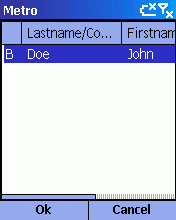
In your Contact Note, enter
<METRO TYPE="home" CITY="PARIS">station1;station2</METRO>
TYPE can be HOME, BUSINESS or OTHER
CITY is the name of your database
You can sort & resize the columns, just click on them. You will see only
the contacts of your currently loaded city.
| Type of the entry |
B for business
H for home
O for other |
| Last name / Company |
If there is no Last name, display the Company Name |
| First name |
First name |
| Station |
Stations of your contacts separated by commas |
|
 |
| Top |
| |
| Detail of a place of interest |
| |
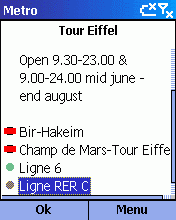
Full information abaout a place of interest.
Only available in selected cities.
|
Stop close to this place of interest. Choose
"Menu/Select" or "Action" to select the stop. Choose
"Menu/Detail" to display detailed information about the stop. |
|
Place of interest. Choose "Menu/Select" or
"Action" to select this point. Choose "Menu/Detail"
to display detailed information about the point. |
|
Place of interest that matches your string in the
preferences. Choose "Menu/Select" or "Action" to select this point.
Choose "Menu/Detail" to display detailed information about the point. |
 |
Line connected to this place of interest, deactivated
by the user. Choose "Menu/Close/Open" to reactivate it. |
|
Line connected to this place of interest. Choose
"Menu/Close/Open" to deactivate it. Choose "Menu/Detail" or
"Action" to display detailed information about the line. |
 |
Line connected to this place of interest, closed at
the selected day and time. |
|
 |
| Top |
| |
| Detail of a contact |
| |
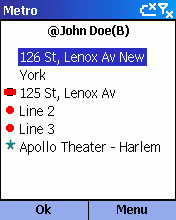
Address of the contact, business, other or home
depend on your contact type.
|
Station close to this contact. Choose
"Menu/Select" or "Action" to select the stop. Choose
"Menu/Detail" to display detailed information about the stop. |
|
Place of interest close to this contact.
Choose "Menu/Select" or "Action" to select this point.
Choose "Menu/Detail" to display detailed information about the point. |
|
Place of interest that matches your string in the
preferences. Choose "Menu/Select" or "Action" to select this point.
Choose "Menu/Detail" to display detailed information about the point. |
|
Line connected to this contact, deactivated by
the user. Choose "Menu/Close/Open" to reactivate it. |
|
Line connected to this contact. Choose
"Menu/Close/Open" to deactivate it. Choose "Menu/Detail" or
"Action" to display detailed information about the line. |
|
Line connected to this contact, closed at the selected day and time. |
|
 |
| Top |
| |
| Lines List |
| |
|
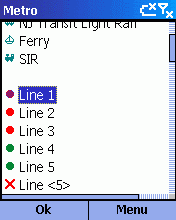
Line deactivated by user. Choose "Menu/Close/Open"
to reactivate it. |
|
Line opened at this time. Choose "Menu/Close/Open"
to deactivate it. Choose "Menu/Detail" or "Action" to display detailed
information about the line. |
|
Line closed at the selected day and time. |
|
 |
| Top |
| |
| Details of a line |
| |
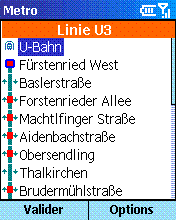
Choose "Menu/Select" or "Action" to select the stop.
Choose "Menu/Detail" to display detailed information about the stop.

 |
First or last station of a line or branch, without connections |

 |
First or last station of a line or branch, with connections |
 |
Stop, without connections. |

 |
One-way stop, without connections. |
 |
Stop, with connections. |

 |
One-way stop, with connections. |
|
 |
| Top |
| |
| Auto-fill option |
| |
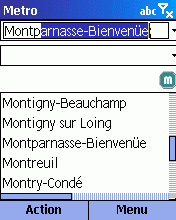
The program will fill the "from" or "to" field with
the first match after you have entered 3 letters.
| Action |
If the field is empty, the list of the last stops used are displayed.
Otherwise the list of matching stops is displayed below. |
|
 |
| Top |
| |
| Filtered input option |
| |
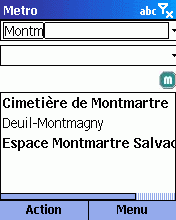
The program will filter all the stations with your input
after you have entered 3 letters.
The type of comparison is defined by your regional setting.
Ex: in French accented letters are equivalent to not accented ones.
This option is not recommended for slow devices.
| Action |
If the field is empty, the list of the last stops used are displayed.
Otherwise the list of matching stops is displayed below. |
|
 |
| Top |
| |
| Places of Interest (POIs) |
| |
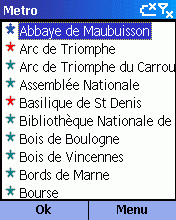
| Menu / Select or Action |
Select this place of interest. |
| Menu / Detail |
Display detailed information about this
place of interest. |
|
Place of Interest |
|
Place of interest that matches your string
in the preferences (only in selected cities) |
|
 |
| Top |
If you wish to use
Métro on a
"certified" device, you will have to "unlock" it.
The authors cannot be held responsible
for any damage, direct or indirect, resulting from your
unlocking your smartphone. |



 Métro
Métro
